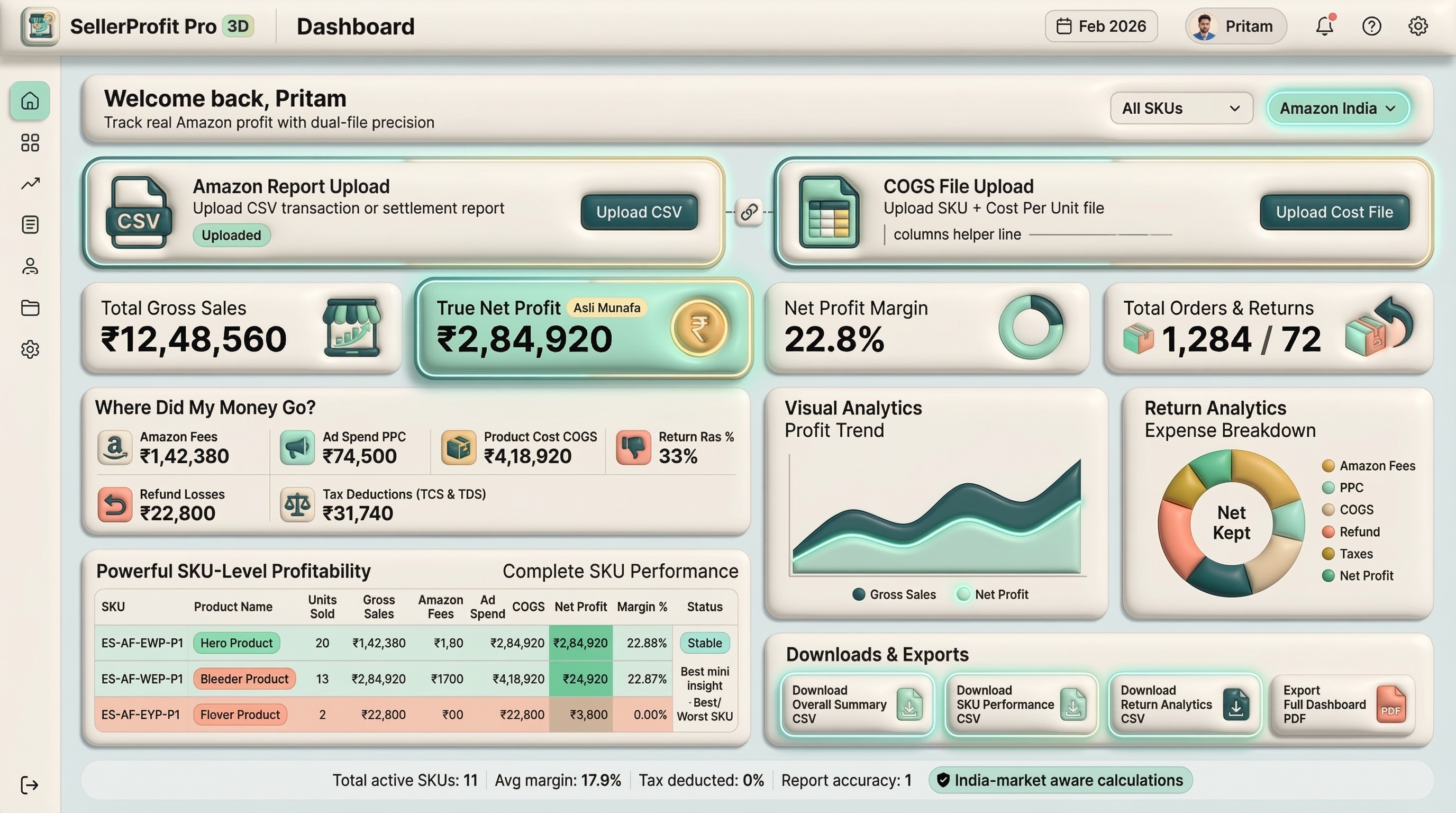
Know Your Real Amazon Profit—After Fees, Ads, Returns and COGS.
Upload your Amazon reports and understand how sales become contribution profit after Amazon fees, advertising, refunds and product costs.
No credit card required
Profit OverviewIllustrative sample
Reconciliation Status Sample data complete
No live seller data
Contribution Profit₹2,10,000
Profit Margin21.0%
Gross Sales₹10,00,000
Total deductions−₹7,90,000
Contribution Profit₹2,10,000
Illustrative insightProduct costs are the largest deduction in this sample.
Built for Amazon India
No credit card required
Detailed profit breakdown
GST and TDS reporting support
The profit problem
Sales Look Good. But What Did You Actually Keep?
Amazon revenue is reduced by marketplace fees, advertising, refunds and product costs. SellerProfit Pro brings these deductions into one understandable profit view.
See every available deduction in one view
Separate Amazon payout from contribution profit
Spot incomplete product-cost data
Illustrative example
How ₹10,00,000 Becomes ₹2,10,000
Gross Sales₹10,00,000
Amazon Fees−₹1,80,000
Advertising−₹1,20,000
Refund Impact−₹70,000
COGS−₹4,20,000
Contribution Profit₹2,10,000
Sample values are illustrative and are not customer results.
Four clear steps
How SellerProfit Pro Works
Move from exported Amazon reports to a prioritized profit decision.
1
Upload Amazon Reports
Add your Amazon transaction and advertising reports using the guided upload flow.
2
Add Product Costs
Upload or enter SKU-level product costs to improve profit accuracy.
3
Review Profit and Reconciliation
See how sales, fees, advertising, returns and COGS affect contribution profit.
4
Fix Your Biggest Profit Leaks
Identify loss-making products, advertising waste and incomplete cost data.
Four focused capabilities
Profit Clarity Across the Decisions That Matter
No wall of vanity metrics—just four connected financial views.
01
Profit Reconciliation
Understand How Amazon Payout Becomes Profit.
Compare calculated totals with available settlement data
Raw report files are parsed in your browser for preview. Summarized report data is sent to backend services when a server-generated report is requested.
Account Security
Firebase manages authentication. Email OTP values are hashed and time-limited in the backend logic.
Calculation Transparency
Profit views separate Amazon payout, product costs and available report deductions, with missing-cost warnings where supported.
User-Controlled Data
Local data can be cleared in the app. Trusted report snapshots currently expire after up to seven days; account deletion can be requested.
Simple starting options
Start Free. Upgrade When You Need More Reporting.
Prices below mirror the current INR billing screen. Checkout is handled through Razorpay after sign-in.
SellerProfit Pro helps Amazon sellers review contribution profit after available settlement charges, advertising, refunds and product costs.
The current guided flows accept Amazon transaction CSV data, Sponsored Products reports, Search Term reports, and SKU cost files in supported CSV or spreadsheet formats.
The current profit report subtracts uploaded product costs from the calculated Amazon payout. The payout already reflects available settlement items such as fees, advertising, refunds and adjustments. Operating expenses such as salaries and rent may not be included.
No direct Amazon account connection is required in the current product. You upload supported exported reports through the guided flow.
The report identifies missing SKU costs and currently calculates those missing items using zero product cost, which can overstate contribution profit until the costs are completed.
GST and TDS summary fields are available in the current finance and export workflows. TCS fields are included where supported by the accounting export contract; always verify the source report with your accountant.
Raw files are parsed in the browser for preview. Summarized derived data may be sent to backend services, and current trusted report snapshots are designed to expire after up to seven days.
You can clear local app data using the existing control. For account and applicable server-data deletion, submit a request from the public deletion page using your registered email.
Paid reporting includes financial exports designed for accountant and Tally-oriented workflows. Your accountant should verify the outputs against source records.
Yes. You can inspect the illustrative sample dashboard and begin the free guided report flow without entering card details.
Your next report can start free
Stop Guessing Your Amazon Profit.
Upload your reports, add product costs and see where your revenue is actually going.
💡 New to SellerProfit Pro? Click to Explore Demo Mode with Sample Data ➔
Sample Data Snapshot — Sharma Gadgets
Gross Sales
0
Fees
0
Net Profit
0
Know Where Your Amazon Money Goes
Profit truth · Ad waste detection · CA-ready
exports
Profit Truth
Ad Waste Radar
Export Bridge
1 Free
Demo Report Available
See Where Your Amazon Money Really
Goes
Watch vanity Gross Sales shrink into your true take-home profit — live.
See data confidence first, then profit and the actions that need attention.
No profit report loaded
Setup required
Generate Your First Profit Report
Add Amazon transaction data and product costs to calculate contribution profit.
1Upload Amazon transaction report
2Add product costs
3Review data completeness
4Get your first profit insight
Profit Report Is Partially CompleteSome source data is incomplete.
Data confidence
Reconciliation Status
Reconciliation compares source settlements with calculated totals when supported. Data confidence identifies missing inputs without inventing a score.
Reviewing available report sources.
Gross Sales
Order revenue before refunds, Amazon charges, advertising, and product costs.
Not available
Previous period unavailable
Before refunds and costs
Amazon Payout
Settlement payout after Amazon transaction charges and before product costs.
Not available
Previous period unavailable
Before product costs
Contribution Profit
Amazon payout minus product costs. Salaries, rent, and other operating expenses may not be included.
Not available
Previous period unavailable
Product cost data required
Profit Margin
Contribution profit divided by gross sales for the selected report.
Not available
Previous period unavailable
Share of gross sales
Advertising Spend
Advertising charges included in the uploaded Amazon settlement report.
Not available
Previous period unavailable
Attributed by existing report logic
Refund Impact
Refund amount already identified by the existing Amazon report calculation.
Not available
Previous period unavailable
Current uploaded report
Prioritized by impact
Attention Required
Sales to contribution profit
Profit Waterfall
Current uploaded report
A breakdown of gross sales into refunds, Amazon fees, advertising, product costs, adjustments, and contribution profit.
View accessible data table
Profit waterfall values
Step
Amount
Period performance
Profit Trend
Not Enough Historical DataUpload reports from at least two periods to compare profit trends.
Previous-period trend data is unavailable.
Evidence-based explanation
Profit Drivers
Driver analysis unavailableA previous-period dataset is required. No causal claims have been generated.
Loss-making products first
SKU Performance
SKU contribution profit, units, refunds, and status
SKU
Units
Refunded
Contribution Profit
Status
SKU data unavailableGenerate a report with product data to review SKU performance.
Current report signals
Recent Alerts
SellerProfit Pro
Demo Mode Active
💡🔍
What do you want to know?
Pick what matters most — get your first insight in under 60 seconds.
Where is my real
profit?
Upload Amazon CSV + COGS file
Which ads are wasting
money?
Upload Sponsored Products report
I need CA-ready
exports
Tally / accountant-ready CSV
What is my Break-Even
ACOS?
Instant PPC ad limit math — no CSV upload needed
1 free demo report
· No credit card needed
SellerProfit
Pro
Report Builder
Private & Secure ProcessingYour raw files are
processed in your browser for preview. Summarized data is securely sent to our servers to
generate your reports.
Upload Files
Amazon
Report CSV
CSV
Not Uploaded
Matched by SKU
COGS /
SKU Cost
Best for 50+ SKUs
Not Uploaded
💡 Don't have a CSV ready? Enter Costs Manually in 30 Seconds ➔
Date Range
Last 7 Days
Last 30 Days
This Month
Process All Data
Validation
Amazon CSV: Waiting...
COGS File: Waiting...
Ads
Analyzer
Ads Report Builder
Private & Secure ProcessingYour raw files are
processed in your browser for preview. Summarized data is securely sent to our servers to
generate your reports.
Upload Files
Ads Report (CSV)
Not Uploaded
COGS /
SKU Cost
Not Uploaded
3. Search Term Report
🔥 Bonus:
Unlocks Negative Keywords
Not Uploaded
Date Range
Last 7 Days
Last 30 Days
This Month
Process All Data
Validation
Ads CSV: Waiting...
COGS File: Waiting...
Profit Report
AI RETENTION INTELLIGENCEPRO DELIVERY
📲 AI Weekly WhatsApp Digest (Your
Pocket Media Buyer)
Get a plain-English AI executive summary of your ad leaks and
profits delivered to your WhatsApp every Monday at 10:00 AM.
Every Monday · 10:00 AM
Use international format, for example
+91 98765 43210.
SellerProfit Pro AI Live WhatsApp Preview
✓✓
ROI Guarantee ·
7-day money-back protection
Preview all 16 languages free. Pro activates
secure Monday delivery.
Source INR
All Reports
1. Summary
2. Breakdown
3. GST
4. Charts
5. SKUs
6. Returns
🤑 Refunds
Money Leak Snapshot
💰
Gross Sales0
📦 Amazon Fees-
0
📢 Advertising- 0
🏭 COGS- 0
↩️ Refund Impact-
0
🏦
Net Take-Home0
Complete Business Summary
Amazon Payout
0
(Settlement
payout before COGS)
Total COGS Cost
0
(Mfg cost
for net sold)
Actual Take-Home Profit
0
Margin:0%
Winner
SKU-
Winner
State/City-
Amazon Breakdown
Gross Sales (Orders)0
Refunds0
Selling Fees0
FBA Inventory Fee0
Fulfilment Fee Refund0
Shipping Services0
Cost of Advertising0
Adjustment Cost0
Reimbursements0
Bank Transfer (Sent)0
GST & Tax
Total Sales Tax Liable0
TDS (Section 194-O)0
Expense Breakdown
Top SKUs Net Profit
Complete SKU Performance
Return Analytics
Total Orders Shipped0
Total Units Shipped0
Total Units Returned0
Return Rate (Units) %0%
Highest Return SKU-
Ads Performance Alert
Total Ad Spend
0
Total Ad Sales
0
Overall ROAS
0x
Overall ACOS
0%
Ad Budget Wasted
0%
Net Ad Profit
0
CPA (Cost/Order)
0
Money-Wasting SKUs 💸
Hidden Heroes ⭐
Top 10 Search Terms 🔥
Negative Keywords 🚫
🤑 Amazon Reimbursement Finder (Free Money)
🎉
Scanning your report for reimbursement opportunities...
Total Owed
—
Affected SKUs
—
Success Rate
98.4%
🔒
Downloads
No files downloaded yet.
Integrations
Connected commerce tools
Your existing Amazon CSV, COGS and advertising import workflows remain available. Additional connections will appear here when enabled.
Amazon report importsActive
COGS file workflowActive
Additional integrationsPlanned
Settings
Profile Details
Seller Name:Pro User
Email:Not signed in
Preferences
App Theme
Toggle
Language
Legal & Support
Privacy Policy
Terms & Conditions
Refund & Cancellation Policy
Contact Us / Supportsellerprofitpro@gmail.com
How We Handle Your Data
Browser-First Processing
Your raw CSV files are parsed in your
browser for preview. Only summarized calculations are sent to our secure servers to generate
reports.
Data Deletion
Use "Clear App Data" below to erase all
local data instantly. Contact support to delete your account and server data permanently.
Encryption & Security
All communication uses HTTPS encryption.
OTPs are stored as hashed values. Your password is never stored by us — Firebase Auth handles it
securely.
Danger Zone
Choose Your Plan
Unlock Full Power
Choose the plan
that fits your business.
🇮🇳 INR (₹)
🌍
USD ($)
Monthly
YearlySave
72%
Starter
10 reports/month
₹166
/month
BEST VALUE
Pro
Unlimited + Ads Analyzer
₹599
/month
Unlimited
Calculations
Save & Export
Reports
Ads ROI Deep
Analysis
Tally / CA
Export
Priority Support
Secure payments via Razorpay · UPI /
Cards / NetBanking
Help Center
Guides & FAQ
How
to download Amazon CSV
1. Go to Seller Central
→ Reports → Payments → Transaction View 2. Set your date range 3. Click "Download" →
Choose CSV format 4. Upload the downloaded file in SellerProfit Pro
How to
prepare COGS file
1. Create a CSV with 2
columns: SKU and Price 2. SKU must exactly match your Amazon SKU 3. Price =
your manufacturing/purchase cost per unit 4. Save as .csv and upload in Report Builder
Why
numbers differ from Seller Central
Amazon shows vanity
metrics (sales before fees). We show actual take-home after ALL deductions: fees, FBA, shipping,
ads, refunds, COGS, and tax.
Report
Glossary
Gross Sales =
Total before deductions COGS = Cost of Goods Sold ACOS = Ad spend ÷ Sales ×
100 CPA = Cost Per Acquisition ROAS = Return on Ad Spend Negative
Keywords = Search terms with spend but 0 sales
How to
download Ads report
1. Seller Central →
Advertising → Campaign Manager 2. Sponsored Products tab 3. Select date range → Create
Report 4. Download CSV and upload in Ads Analyzer
About SellerProfit Pro
The Profit Truth
Engine for Amazon Sellers
Know exactly
where your Amazon money goes — every fee, every refund, every hidden cost.
10 Languages
Global
Secure
Why
SellerProfit Pro Exists
Amazon Seller Central shows you sales numbers — but not the truth. After platform fees, FBA charges,
refunds, advertising costs, and product expenses, most sellers have no idea what they actually
earned.
SellerProfit Pro was built to solve exactly that. Upload your Amazon transaction report, add your
product costs, and see your real take-home profit — broken down by SKU, by fee type, and by time
period.
No vanity metrics. No spreadsheets. Just the truth about your Amazon business — in seconds.
What the
Platform Helps You Do
💰
Real Profit Calculation
See actual take-home after ALL Amazon deductions + your product
costs.
🎯
Ad Spend Intelligence
Identify money-wasting SKUs, negative keywords, and hidden top
performers.
📊
Accountant-Ready Exports
Tally Prime / ERP 9 compatible with GST, TDS, TCS breakdowns.
🔒
Privacy-First Architecture
Raw files processed locally. Only summarized data reaches our
servers.
Product
Philosophy
📌 Numbers should tell the truth, not sell a dream.
📌 Every seller deserves clarity — regardless of scale or
language.
📌 Security and honesty are non-negotiable.
Who It's
For
Solo Amazon Sellers
Brand Owners (10-50+ SKUs)
CAs & Accountants
E-commerce Agencies
Founded by Pritam Guddetwar
Solo-built with a focus on profit truth, privacy, and practical
seller decisions.
Start with a free report. See the truth.
Version 2.0 · 10 Languages · Privacy-First · Made in India 🇮🇳
Break-Even ACOS Simulator
Break-Even ACOS & PPC Profit
Simulator
Type your numbers below and see live break-even math instantly — free, no
upload needed.
Break-Even ACOS %
0.0%
Target ACOS (15% Margin)
0.0%
Net Profit / Unit (₹)
₹0
Pro Feature Locked
You tested 1 SKU manually! To automatically calculate Break-Even ACOS and loss
protection for all your uploaded Amazon SKUs at once, upgrade to Pro for just ₹599/month.
📊 Pro Bulk ACOS Master
Dashboard
Break-even math applied to every matched SKU
using your current assumptions above.
SKU
Price (₹)
COGS (₹)
Break-Even ACOS %
Target ACOS %
Net Profit/Unit (₹)
Status
Enter Costs Manually
Costs are saved automatically on this device for next time.